3D Text Effect Mockup: A Comprehensive Evaluation for Designers
In the competitive landscape of digital and print design, visual hierarchy is paramount. One of the most effective methods to achieve immediate impact is through three-dimensional typography. The 3D Text Effect Mockup serves as a critical tool for designers seeking to integrate realistic depth into their projects without the steep learning curve associated with complex 3D modeling software. This resource provides a structured environment where text can be transformed from flat vectors into tangible, light-reflecting objects that interact convincingly with their surroundings.
Understanding the Core Functionality
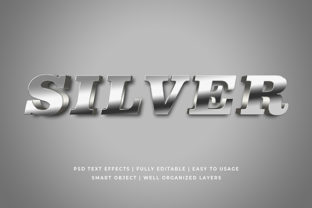
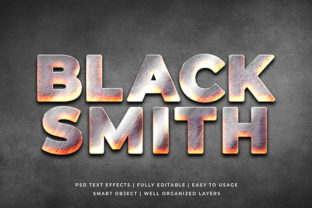
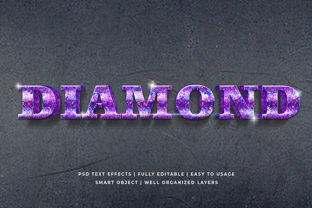
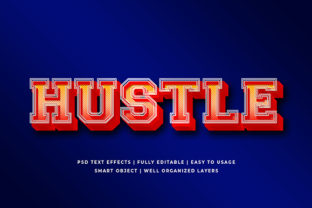
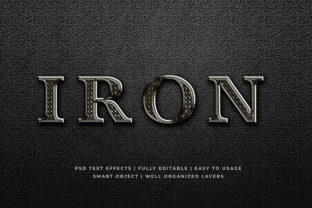
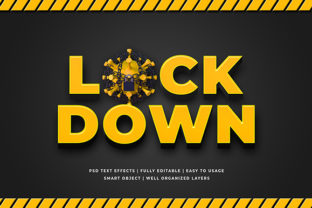
A 3D Text Effect Mockup is essentially a pre-configured template designed within Adobe Photoshop. Its primary function is to allow users to insert custom text into a scene that has already been rendered with lighting, shadows, textures, and perspective. Unlike creating a 3D effect from scratch using plugins like Cinema 4D or Blender, which requires knowledge of geometry, materials, and camera angles, this mockup approach utilizes smart object technology. This means the underlying 3D structure is fixed, but the content within it is fully editable.
The architecture of these files typically involves high-resolution canvases, often sized at 2000x1300 pixels, ensuring that the output remains crisp even when scaled for large formats. The file organization is a crucial component of its utility. By maintaining a fully layered structure grouped within folders, the mockup ensures that the user can navigate the complexity of the design without becoming overwhelmed. Each element, from the base plane to the specular highlights, is separated logically, allowing for targeted adjustments if necessary.
Key Features and Technical Specifications
When evaluating a 3D Text Effect Mockup, several technical specifications define its usability and professional potential. The most significant feature is the Smart Object Replacement capability. This allows designers to double-click a layer thumbnail, paste their own text or graphic, save the changes, and have them automatically update within the 3D scene. This workflow eliminates the need to manually warp, extrude, or texture new elements, saving substantial time in the production process.
Resolution and Scalability: With a standard resolution of 2000x1300 pixels, these mockups are suitable for high-definition displays and various print requirements. The high resolution ensures that edges remain sharp and anti-aliasing is handled correctly, preventing pixelation when used in detailed presentations or large-format posters.
Editability and Organization: The claim of being "easy to edit" is supported by the well-organized layer structure. Folders group related effects, such as reflections, shadows, and the main text body. This organization is vital for non-experts who may not understand the hierarchy of 3D rendering layers. Furthermore, the availability of multiple variations (often cited around 100 editable styles) provides a wide range of aesthetic choices, from metallic finishes to matte textures, catering to diverse brand identities.
Practical Applications and Use Cases
The versatility of a 3D Text Effect Mockup makes it applicable across a broad spectrum of design disciplines. In web design, these effects are frequently utilized for website headers, hero sections, and call-to-action buttons where grabbing attention is essential. For social media management, the dimensions and visual weight of 3D text make them ideal for Facebook covers, YouTube channel art, and Twitter banners, where images must stand out in crowded feeds.
In promotional materials, the mockup excels at elevating the perceived value of a product. It is commonly used in banner promotions, logo presentations, and poster designs to create a sense of premium quality. Print applications include flyers, placards, and greeting cards, where the tactile illusion of 3D adds physical presence to a two-dimensional medium.
Clothing and apparel design also benefit significantly from this tool. T-shirt graphics require text that appears to sit on top of fabric folds; 3D mockups simulate this interaction effectively. Additionally, illustrators use these assets to add depth to character names or titles in editorial illustrations, bridging the gap between traditional illustration and modern digital typography.
Benefits and Tradeoffs
The primary advantage of using a 3D Text Effect Mockup is the elimination of the skill barrier. Users do not need to understand vector extrusion, normal mapping, or ray tracing to achieve professional results. This democratization of 3D design allows generalists and marketers to produce high-quality visuals without relying on specialized 3D artists. The time-saving aspect is substantial; what might take hours to model and render in dedicated software can be accomplished in minutes with a smart object replacement.
However, there are tradeoffs to consider regarding creative control. Because the lighting and geometry are pre-baked into the smart object, users cannot easily alter the angle of the light source or the curvature of the text unless they modify the underlying 3D model, which is often locked in these templates. If a project requires a specific, unique camera angle that does not match the mockup's preset, the user may find the limitations restrictive compared to building a scene from scratch.
Another consideration is file size. High-resolution, fully layered PSD files can become quite large, potentially slowing down older computers or causing compatibility issues with older versions of Photoshop. Users must ensure their hardware meets the processing requirements to handle 100+ layers and high-bit-depth images efficiently.
Situational Fit and Alternatives
A 3D Text Effect Mockup is a strong fit for scenarios requiring speed, consistency, and professional aesthetics without deep technical expertise. It is particularly valuable for agencies working under tight deadlines, small business owners creating their own marketing collateral, or students learning basic layout principles before moving to advanced 3D tools.
Conversely, alternatives may be worth considering if the project demands absolute uniqueness. If a client requires a logo that interacts with a specific 3D environment (e.g., sitting inside a glass bottle or reflecting off a wet surface), a generic mockup may not provide the necessary realism. In such cases, investing time in learning 3D software or hiring a specialist is more appropriate. Similarly, for minimalist designs where flat design principles are preferred, a heavy 3D effect might be visually distracting and counterproductive.
Decision-Making Insights
To determine if a 3D Text Effect Mockup aligns with your goals, evaluate your current skill set against your project requirements. If you possess intermediate skills in Photoshop but lack 3D experience, this tool offers the perfect bridge. It allows you to leverage existing workflows while achieving results that look professionally rendered.
Consider the volume of work required. If you need to generate hundreds of variations for different campaigns, the efficiency of smart object replacement becomes a decisive factor. The ability to swap text instantly across 100 different styles means you can rapidly prototype ideas and present options to clients without rebuilding the scene each time.
Finally, assess the intended output medium. For screen-based delivery where compression and loading times matter, ensure the final export is optimized. For print, verify that the 2000x1300 resolution meets the printer's DPI requirements. While the mockup provides the framework, the designer's responsibility remains to select the right font, color palette, and composition to ensure the final message is clear and impactful.
In conclusion, the 3D Text Effect Mockup represents a pragmatic solution for modern design challenges. It balances the desire for high-end visual effects with the practical constraints of time and technical skill. By understanding its capabilities and limitations, designers can make informed decisions on whether to integrate this tool into their repertoire or seek alternative methods for their specific creative needs.