Butterfly Card Design: A Digital Download Guide
Butterfly Card Design represents a seamless blend of artistic flair and practical crafting, offering creators an instant way to produce stunning greeting cards without needing advanced drawing skills. This digital download is specifically engineered for users who want professional-looking results with minimal effort. Whether you are a hobbyist looking to add a personal touch to birthday invitations or a small business owner creating branded stationery, this design provides the perfect foundation.
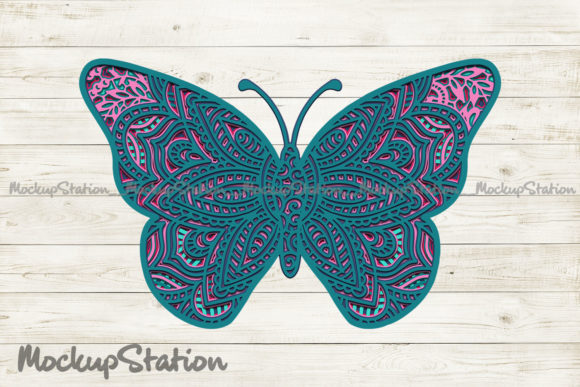
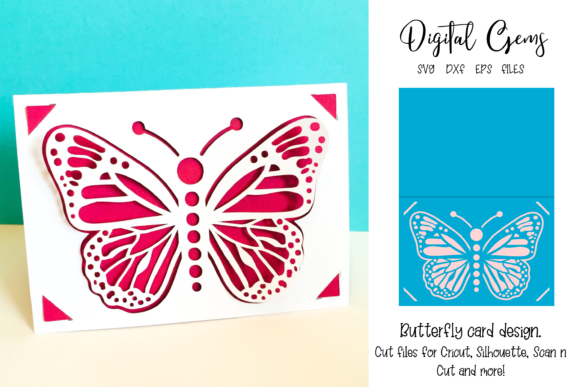
The core appeal of this project lies in its versatility and ease of use. Unlike complex templates that require hours of tweaking, this design comes ready to go once you understand the basic setup. The visual features a delicate butterfly motif that serves as the focal point, but it is the structural engineering behind the scenes that truly makes it shine. By providing multiple file formats, the creator ensures compatibility with almost any cutting machine software on the market today.
Understanding the Digital Package
Before you begin your creative journey, it is important to know exactly what you are receiving. This is a digital download, meaning there is no physical product shipped to your door. Instead, you receive a ZIP file containing the raw assets needed to bring the design to life. Once downloaded, you must extract the files from the ZIP archive before they can be used in your software.
The package includes three industry-standard vector formats:
- SVG file: Ideal for web-to-print workflows and compatible with Cricut Design Space.
- DXF file: Perfect for Silhouette Studio and other vector-based cutting applications.
- EPS file: Best suited for Adobe Illustrator or CorelDRAW users who need high-resolution editing capabilities.
Having these options ensures that regardless of your preferred software, you have access to the same high-quality lines and shapes. These vector files allow you to scale the design up or down without losing any detail, ensuring crisp edges whether you are making a tiny tag or a large banner.
Step-by-Step Setup for Success
One of the most common hurdles for beginners is understanding how to prepare the design for cutting. The instructions provided with the Butterfly Card Design are straightforward, but following them precisely is crucial for a clean fold. When you upload the design to your software, you will see several distinct layers grouped together.
First, you must ungroup the design. This separates the individual elements, allowing you to manipulate them independently. Next, look for the line running directly through the middle of the butterfly card. In many default settings, every line is set to 'cut,' which would slice the card into two separate pieces. To create a functional card, you need to change the setting of this specific line from 'cut' to 'score.' This tells your machine to press a shallow groove into the paper rather than slicing all the way through.
Finally, you must 'attach' the butterfly element to the card base. This step locks the position of the decoration relative to the fold line, preventing the software from scattering the parts during the cutting process. Without attaching these elements, the butterfly might end up printed or cut in the wrong spot, ruining the symmetry of the final piece.
Visual Clarity and Real-World Application
It is helpful to manage expectations regarding the preview images often found on product pages. Any backgrounds, logos, mock-ups, photos, framed images, or cut-out examples shown are for illustration purposes only. They demonstrate the potential of the design but do not represent the actual digital files you will receive. The beauty of this approach is that it allows you to imagine the possibilities without being restricted by the photographer's styling choices.
Once you have processed the files correctly, the Butterfly Card Design becomes a blank canvas for your creativity. You can choose cardstock in vibrant colors to make the butterfly pop, or stick to elegant pastels for a softer look. Because the design is a digital vector, you can also layer different materials, such as adding glitter paper underneath the butterfly wings or using foil transfer sheets for a metallic finish.
This flexibility makes it suitable for a wide range of occasions. It works beautifully for weddings, where a simple yet elegant insect motif symbolizes transformation and joy. It is equally effective for baby showers, representing new beginnings, or even corporate events where a unique, handmade feel adds value to the invitation.
Who Benefits Most from This Design?
The target audience for this digital asset is incredibly broad. For beginners, the pre-made structure removes the guesswork of measuring and scoring, reducing the frustration often associated with paper crafts. Casual users appreciate the speed; you can produce a batch of cards in under an hour once the workflow is established.
For entrepreneurs and small business owners, this design offers a cost-effective way to generate inventory. Instead of paying for expensive custom printing services, you can manufacture your own branded stationery at home. Bloggers and marketers might use these cards as promotional items or giveaways, adding a tangible connection to their digital content. Educators and freelancers can utilize the design for classroom projects or client gifts, showcasing a high level of care and attention to detail.
Practical Considerations Before You Start
While the Butterfly Card Design is user-friendly, there are a few technical aspects to keep in mind to ensure a smooth experience. The quality of your final output depends heavily on the settings you choose in your cutting software. Always run a test cut on scrap paper to verify that the score line is deep enough to fold cleanly but not so deep that it tears the material.
Additionally, consider the weight of the cardstock you plan to use. While the design handles standard weights well, extremely thick board may require a double-score pass or a specialized scoring tool attachment on your machine. Conversely, very thin paper might tear if the score pressure is too aggressive. Finding the right balance between material choice and machine settings is part of the fun of the crafting process.
Another factor to consider is the finishing touches. Since the design is digital, you are free to add text, dates, or personal messages using your software's text tools before sending the file to the cutter. This customization turns a generic template into a heartfelt, one-of-a-kind gift. However, remember that any text you add is not included in the original download and must be created separately within your chosen program.
Conclusion
In summary, this Butterfly Card Design is more than just a pattern; it is a toolkit for creativity. By ungrouping the elements, adjusting the score line, and attaching the components correctly, you unlock the full potential of the design. Whether you are creating a single card for a loved one or producing hundreds for a boutique shop, the ability to customize the color, texture, and message makes this digital download a valuable resource for anyone in the crafting community.
The inclusion of SVG, DXF, and EPS files ensures that you are never locked out of the process due to software incompatibility. With a little practice and attention to the setup steps, you can consistently produce high-quality, professional-grade cards that stand out from mass-produced alternatives. Embrace the freedom of digital crafting and let the butterfly take flight in your next project.