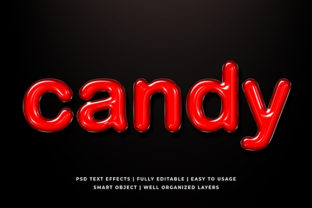
Transforming Digital Text with the Candy 3D Text Effect Mockup
In the rapidly evolving landscape of digital design, visual hierarchy is paramount. Whether a business owner is launching a new product or an educator is creating engaging classroom materials, the ability to make text stand out is crucial. This is where the Candy 3D Text Effect Mockup becomes an essential asset. It represents more than just a decorative tool; it is a comprehensive solution designed to elevate typography from flat lines on a screen to vibrant, tactile elements that capture attention immediately.
The modern web and social media ecosystem demand content that stops the scroll. Standard fonts often fail to convey the energy required for promotional banners or eye-catching website headers. By integrating high-quality three-dimensional effects, designers can create depth and texture that mimics real-world objects. The specific features of this mockup suite allow users to achieve professional-grade results without needing advanced graphic design skills, making it accessible to a wide range of creators.
Understanding the Core Capabilities of the Design Suite
The foundation of this design resource lies in its technical specifications and user-friendly architecture. At its core, the package consists of files sized at 2000x1300 pixels, providing a high-resolution canvas suitable for both web display and print applications. This resolution ensures that whether the final output is viewed on a mobile device or printed as a large poster, the text remains crisp and free from pixelation.
A critical component of the workflow is the inclusion of Smart Object Replacement technology. In the world of Adobe Photoshop, smart objects allow for non-destructive editing. This means that when a user inserts their own text into the template, the complex layer styles, shadows, highlights, and textures are automatically applied to the new content. Users do not need to manually recreate the lighting effects or bevels for every word they type. This feature drastically reduces the time required to produce a finished project while maintaining consistency across multiple designs.
The file structure itself is meticulously organized. The mockup includes 100 editable variations, each housed within fully layered folders. This organization is vital for professionals who manage large projects. Instead of navigating a chaotic list of hundreds of layers, designers can find specific effects within logical groups. This "well-organized" approach prevents errors during the editing process and allows for quick adjustments to color schemes or dimensions.
Accessibility for All Skill Levels
One of the most significant barriers to entry in graphic design is the steep learning curve associated with software like Photoshop. Many individuals possess great ideas but lack the technical know-how to execute them. The No Skill Requirement aspect of this mockup addresses this gap directly. By simplifying the interface and automating complex styling through smart objects, the tool democratizes access to high-end design aesthetics.
For hobbyists and small business owners, this accessibility translates into cost savings and creative freedom. Instead of hiring a professional designer for every social media post or flyer, these users can generate unique visuals in-house. The Easy To edit nature of the templates means that a change can be made in seconds. A user can swap out a brand name, adjust a slogan, or change the color palette to match a seasonal campaign without ever touching a complex blending mode or mask.
This ease of use does not compromise quality. Despite the simplified workflow, the output retains the characteristics of a premium product. The High Resolution files ensure that the final images are ready for publication immediately. There is no need for upscaling or additional processing, which streamlines the production pipeline for agencies and freelancers alike.
Diverse Applications Across Industries
The versatility of the Candy 3D Text Effect Mockup makes it applicable to a vast array of industries and use cases. Its primary function is to add dimension to text, but the implications of this are far-reaching. Below are several key areas where this tool proves particularly effective.
- Website Elements: Modern websites rely heavily on hero sections and call-to-action buttons. Using 3D candy-style text can transform a standard landing page into an immersive experience. The playful yet professional look works well for e-commerce sites selling confectionery, toys, or lifestyle products.
- Social Media Covers: Platforms like Facebook, YouTube, and Twitter have specific cover image requirements. The 2000x1300 pixel size is perfectly suited for these formats. A consistent 3D text style across all channels helps build brand recognition. For example, a YouTuber can use the mockup to create a banner that matches the aesthetic of their video thumbnails.
- Banner Promotions: In digital advertising, space is limited, and attention spans are short. A bold, 3D text effect cuts through the noise of static advertisements. Whether for a flash sale or a product launch, the depth created by the mockup draws the eye immediately.
- Logo Presentations: When pitching a logo concept to a client, presenting it in a mockup context adds realism. Placing a flat logo on a 3D background helps clients visualize how the brand will appear in the real world. This mockup allows for customizing the text to fit various logo concepts.
- Poster and Flyer Design: Print materials require high fidelity. The high-resolution capability of these files ensures that posters for events, flyers for local businesses, and placards for public announcements look sharp when printed.
- Apparel and Merchandise: T-shirt design and clothing branding often benefit from textured graphics. The 3D effect simulates embroidery or puff print, giving fabric designs a realistic appearance before they are manufactured.
- Greeting Cards and Illustrations: For personal projects, such as birthday cards or holiday greetings, the playful nature of candy-themed 3D text adds a touch of whimsy. It allows creators to produce custom illustrations that feel handmade yet professionally finished.
The Workflow: From Concept to Final Output
Integrating this tool into a design workflow is intuitive. The process typically begins with selecting one of the 100 editable options available in the folder structure. Once the desired base file is opened in compatible software, the user locates the Smart Object layer. By double-clicking this layer, a new window opens where the user can paste their text or import a vector shape.
After entering the desired content, saving the document updates the main view instantly. The complex layer styles—such as gradients, drop shadows, and inner glows—are recalculated to fit the new geometry. This automation ensures that the text maintains its 3D integrity regardless of length or font choice. Because the layers are Fully layered well Organized layer in Folders, designers can further tweak individual aspects if needed. They might want to adjust the lighting direction or change the texture of the surface the text sits on. These granular controls provide flexibility for those who wish to push the design beyond the default settings.
This workflow supports rapid iteration. A marketing team can generate ten different versions of a campaign headline in the time it usually takes to create one. This speed is invaluable during brainstorming sessions or when responding to tight deadlines. The ability to test multiple variations quickly leads to better decision-making and higher-quality final products.
Strategic Advantages for Business and Education
For business owners, the strategic advantage of using the Candy 3D Text Effect Mockup lies in brand differentiation. In a crowded marketplace, generic designs are easily ignored. By utilizing unique, high-quality 3D typography, brands can establish a distinct visual identity. The consistency provided by the organized folders ensures that all marketing collateral, from email headers to physical flyers, shares a cohesive look.
Educators and researchers also benefit from this tool. Visual aids are powerful teaching tools. Creating dynamic presentations or educational posters with 3D text can help engage students who might otherwise be disinterested in traditional text-heavy slides. The ability to create custom illustrations and placards allows teachers to tailor content to specific lessons, making abstract concepts more concrete and visually appealing.
Furthermore, the High Resolution nature of the files supports scalability. A business can start with a small social media post and later expand the same design to a billboard or a large-format banner without losing quality. This scalability protects the investment in the design resources, ensuring that assets remain useful over time as the business grows.
Considerations for Implementation
While the tool offers immense value, successful implementation requires a basic understanding of design principles. Even though the No Skill Requirement label suggests simplicity, the placement of text still matters. Designers should consider contrast, spacing, and readability. A beautiful 3D effect can become illegible if the background is too busy or the colors clash.
Additionally, while the mockup provides the structure, the creativity comes from the user. The 100 Editable options serve as a starting point. To truly leverage the potential, users should experiment with different fonts and color combinations. The Smart Object Replacement feature makes experimentation risk-free, encouraging users to try bold choices that they might hesitate to attempt with manual layering.
It is also important to respect the file organization. Keeping the Fully layered well Organized layer in Folders intact ensures that future edits remain easy. Renaming layers or moving them outside their designated groups can sometimes break the link to the smart object or make the file difficult to navigate later. Adhering to the original structure preserves the integrity of the design system.
Conclusion
The integration of the Candy 3d Text Effect Mockup into a design toolkit offers a powerful way to enhance visual communication. With its combination of High Resolution output, Smart Object Replacement technology, and extensive 100 Editable options, it bridges the gap between amateur enthusiasm and professional execution. Whether used for Website element Walpaper, facebook covers, youtube covers, or t shirt design, the result is always a polished, eye-catching piece of art.
By removing the technical barriers to entry, this resource empowers a broad audience—including professionals, consumers, creators, educators, researchers, hobbyists, and business owners—to express their ideas vividly. As digital content continues to dominate our daily lives, the ability to create standout visuals is not just an advantage; it is a necessity. This mockup suite provides the foundation for that success, offering a flexible, efficient, and high-quality solution for all typography needs.